
Fee collection is an important administrative activity for every educational institution. Keeping track of student payments, identifying outstanding balances, and following up on pending fees can become time-consuming when records must be checked individually.
APTORA IMS provides the Fee Dues Report under the Fee Collection module. It helps authorized users review student-wise fee information, including the actual fee, committed fee, paid fee, and due fee, according to the filters selected.
The Fee Dues Report is a student-wise summary of fee amounts and outstanding balances. It helps the institution identify students with pending payments and review the amount due for the selected institution, academic year, course group, course, course year or semester, and section.
Step 1: Log in to APTORA IMS
Open the APTORA IMS application and sign in using your authorized login credentials. After successful login, the application dashboard is displayed.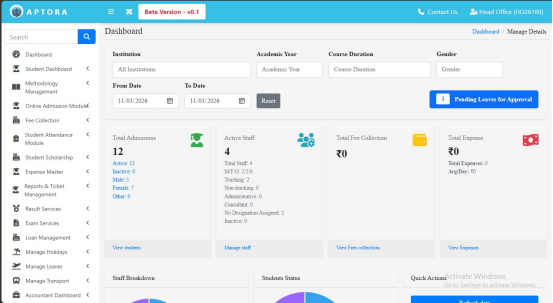
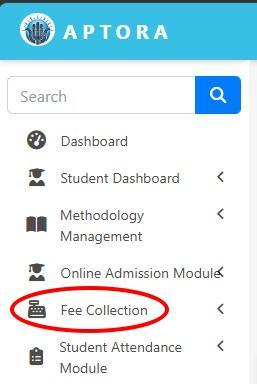
Step 2: Open the Fee Collection Module
From the left-side navigation menu, locate and click Fee Collection to expand its sub-menu.
Step 3: Select Fee Dues Report
In the expanded Fee Collection submenu, click Fee Dues Report. The Students Fees Due List page opens.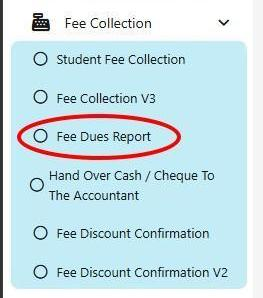
Step 4: Click GET DETAILS
After completing the required selections, click GET DETAILS to retrieve the fee due information for the selected criteria.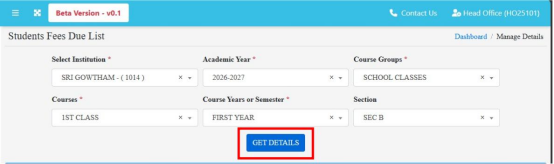
Step 5: Review the Student Fee Due List
The results appear in the Student Fee Due List table. Review the student-wise information and the total amounts shown at the bottom of the table.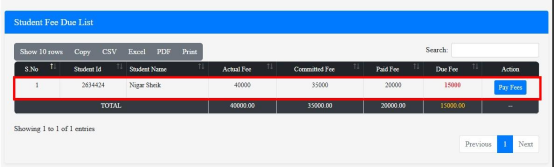
The report displays the fee details for the records matching the selected filters. The information shown will vary according to the institution's student records and payment data.
The generated report screen provides table controls such as Show Rows, Search, Copy, CSV, Excel, PDF, and Print.
Use Search to find a record in the displayed results. Use Copy or the available export options to save or share the report, and use Print to print
the displayed information.
Helps staff identify pending payments for the selected class or section.
Reduces the need to check each student's fee record separately.
Supports follow-up with students and parents regarding pending fees.
Provides export and print options for record keeping, where available.
The Fee Dues Report in APTORA IMS helps educational institutions review student-wise fee payments and outstanding balances in one place.
By selecting the required filters and clicking GET DETAILS, authorized users can generate the report, review fee information, and use the
available search, export, or print options to support fee collection follow-up.